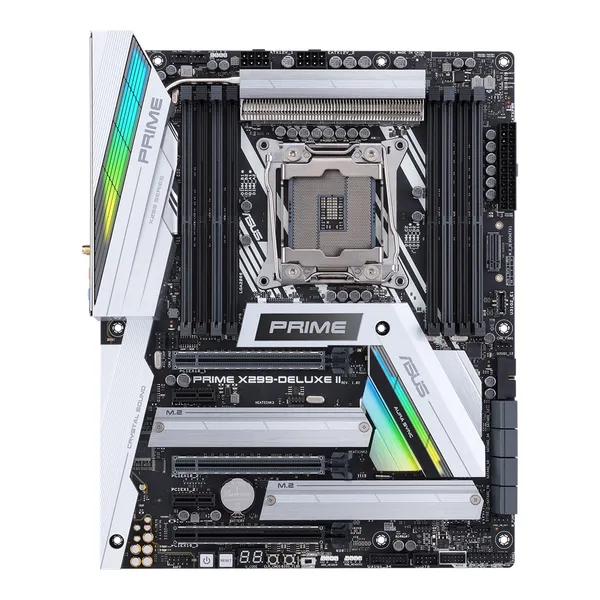
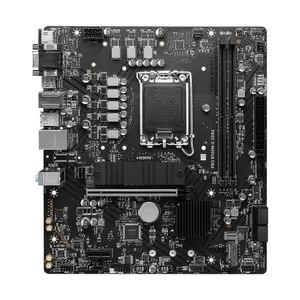
Intel® Socket 2066 Core™ X-Series Processors
Optimized for Intel® Core™ X-Series 10000 Processor Family
The Intel® Turbo Boost Max Technology 3.0 support depends on the CPU types
Intel Core i9 10000 X-Series CPU
Intel Core i9 9000/7000 and i7 9000 X-Series CPU
RAID 0, RAID 1, RAID 5, RAID 10
هشت عدد
چهار کاناله
256گیگابایت
Intel Core i9 10000 X-Series CPU: 8 x DIMM, Max. 256GB, DDR4, 4266(O.C.)/4133(O.C.)/4000(O.C.)/3866(O.C.)/3800(O.C.)/3600(O.C.)/3400(O.C.)/3333(O.C.)/3200(O.C.)/3000(O.C.)/2933/2800/2666/2400/2133 MHz Non-ECC, Un-buffered Memory // Intel Core i9 9000/7000 and i7 9000 X-Series CPU: 8 x DIMM, Max. 256GB, DDR4, 4266(O.C.)/4133(O.C.)/4000(O.C.)/3866(O.C.)/3800(O.C.)/3600(O.C.)/3400(O.C.)/3333(O.C.)/3200(O.C.)/2933(O.C.)/2800(O.C.)/2666/2400/2133 MHz Memory, Supports Intel Extreme Memory Profile (XMP), Hyper DIMM support is subject to the physical characteristics of individual CPUsمگاهرتز
44-Lane CPU-
3 x PCIe 3.0/2.0 x16 (x16, x16/x16, x16/x16/x8)
2 x PCIe 3.0/2.0 x1 x1
28-Lane CPU-
2 x PCIe 3.0/2.0 x16 (x16, x16/x8)
1 x PCIe 3.0/2.0 x16 (x2 mode) x2
2 x PCIe 3.0/2.0 x1 x1
۰
چهار عدد
دو عدد
دو عدد
دو عدد
AQC-111C 5G LAN port, LAN (RJ45) port
Aquantia AQC111C 5G LAN
Intel® I219V, 1 x Gigabit LAN
ASUS Turbo LAN Utility
ASUS LAN Guard
Bluetooth 5.0
Realtek S1220A 8-Channel High Definition Audio CODEC
8کانال
5عدد
یک عدد
Intel Thunderbolt 3 Controller :
2 x USB 3.1 Gen 2 port(s) (USB Type-CTM)
ASMedia USB 3.2 Gen 2 controller : x1
1 x USB 3.1 Gen 2 front panel connector port(s)
Intel X299 Chipset :
5 x USB 3.1 Gen 1 port(s) (1 at back panel, , 4 at mid-board)
Intel X299 Chipset :
4 x USB 2.0 port(s) (2 at back panel, , 2 at mid-board)
ASMedia USB 3.2 Gen 1 Hub :
3 x USB 3.1 Gen 1 port(s) (3 at back panel, )
Bluetooth 5.0
OC Design - ASUS PRO Clock II Technology
5-Way Optimization by Dual Intelligent Processors 5
- 5-Way Optimization tuning key perfectly consolidates TPU, EPU, DIGI+ VRM, Fan Xpert 4, and Turbo Core App
ASUS 5X Protection III :
- ASUS SafeSlot Core: Fortified PCIe Slot prevents damage
- ASUS LANGuard: Protects against LAN surges, lightning strikes and static-electricity discharges!
- ASUS Overvoltage Protection: World-class circuit-protecting power design
- ASUS Stainless-Steel Back I/O: 3X corrosion-resistance for greater durability!
- ASUS Enhanced DRAM Overcurrent Protection - Short circuit damage prevention
- ASUS ESD Guards - Enhanced ESD protection
2 ” LiveDash
AURA :
- Aura RGB Strip Headers
- Aura Lighting Effects Synchronization with compatible ASUS ROG devices
- Aura Addressable Strip Header(s)
ASUS Exclusive Features :
- USB BIOS FlashBack™
- MemOK! II
- AI Suite 3
- Ai Charger
- Onboard Button : Power/Reset
- ASUS UEFI BIOS EZ Mode featuring friendly graphics user interface
- Turbo LAN
- Pre- mounted I/O shield
- ASUS NODE : hardware control interface
ASUS Quiet Thermal Solution :
- Stylish Design Heat-pipe solution
- Stylish Fanless Design with M.2 Heat-sink solution
ASUS Q-Design :
- ASUS Q-Code
- ASUS Q-LED (CPU, DRAM, VGA, Boot Device LED, HDD LED)
- ASUS Q-Slot
- ASUS Q-DIMM
- ASUS Q-Connector
DIY Friendly Design
- Procool
- SafeSlot
Q-Installer
- Auto download driver and software. Friendly for first PC builder.
User´s manual
1 x Vertical M.2 bracket set
6 x SATA 6Gb/s cable(s)
1 x M.2 Screw Package
1 x Supporting DVD
1 x ASUS 2T2R dual band Wi-Fi moving antennas (Wi-Fi 802.11a/b/g/n/ac compliant)
1 x Fan Extension Card II (6 x 4-pin Chassis Fan connectors, 3 x RGB headers, 3 x 2-pin Thermal sensor header)
1 x Fan Extension Card II power cable
1 x Fan Extension Card II NODE connector cable
1 x Fan Extension Card II screw package
1 x DisplayPort cable
1 x SLI HB BRIDGE(2-WAY-M)
1 x Q-Connector
1 x Extension cable for Addressable LED
3 x Thermistor cable(s)
1 x CPU Fan Holder
1. PCIEX1_1 shares bandwidth with USB 3.1 Gen 2 front panel connector(U31G2_E1). It is disabled by default.
PCIEX1_2 shares bandwidth with SATA6G_7.
2. SATA6G_5 & SATA6G_6 shares bandwidth with PCIEX16_3 when using 28-lane CPU.
3. The M.2_1 socket shares bandwidth with SATA_2 port when using M.2 SATA devices. Adjust BIOS settings to use a SATA device.